
Introducing Nostr

I’ve joined the nostr network. Nostr is a lightweight, simple yet extensible open protocol that allows building truly censorship resistant and decentralized social media platforms.
Deploying Crowdsec on k3s
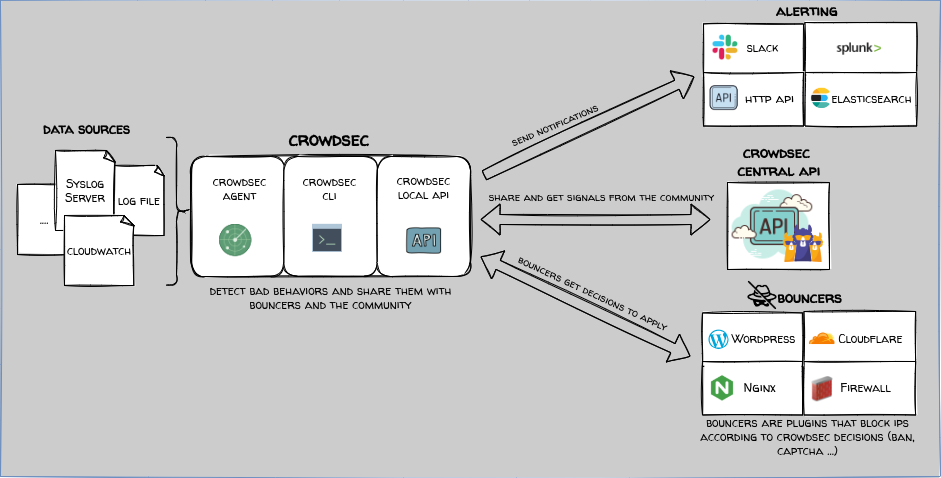
I’ve deployed Crowdsec, a collaborative Intrusion Prevention system, into my Kubernetes cluster using Ansible.
OS/2: A Trip Down Memory Lane

I’m taking a slight detour from my usual posts to share something which happened a few months ago. I was doing a web search on my name (don’t judge, you do it too) and I found my name referenced on a wiki, which also listed my physical address and e-mail address, from when I was in my last year at university in 1995.
This threw me, but it was a different time for the Internet.
Deep Dive Into Helm

Continuing to deep dive into the world of automating a static website using Drone and Kubernetes

Deploying Drone

This blog is published as a static site inside of a container which is rebuilt and deployed to the Kubernetes cluster whenever I check-in changes to the Gitea-hosted repository. Drone is the continuous integration platform which does the heavy lifting.
Gitea - Git with a Cup of Tea

Gitea is a self-hosted Git service similar to Github. I’m running Gitea on k3s as part of the tech stack to host this blog.

Ntfy Self-Hosted Push Notifications

Ntfy is a platform for sending push notifications to your desktop or phone by simply using a PUT/POST HTTP request. In other words, it’s pub-sub. Clients publish to a topic and subscribers to the topic will be notified when something new is published. Simple and effective way to get your own push notifications. I’ve previously written how I use Ntfy with Tasker.
Dwarf Fortress Launch Week

This week was eventful including a significant and highly anticipated event in my life as a gamer. The long-awaited launch of Dwarf Fortress on Steam and Itch.io.
Nextcloud

Nextcloud is a collaboration platform which can be self-hosted to achieve complete control over your data. Nextcloud puts your data at your fingertips, under your control. Store your documents, calendar, contacts and photos on a server at home.
Vaultwarden for ALL the Passwords

Vaultwarden is an implementation of the Bitwarden API in Rust. It’s fast, lightweight, secure, and compatible with the official Bitwarden clients. It’s perfect for self-hosting a password manager for your family and a few friends. I’ve run it for over two years and it is rock solid. I support Bitwarden as well by buying a personal subscription and recommend it to my clients for their enterprise password management needs.
Dynamic DNS on Kubernetes with Cloudflare

A big challenge of hosting applications on home Internet is that ISPs usually provide a dynamic IP address and a static IP address is expensive or unavailable. Services such as noip and dyndns solve this, but they usually have a small fee or are very limited and require running their software. I’m already using Cloudflare for DDoS protection and caching so it made sense to me to use Cloudflare as my authoritative DNS and use the Cloudflare API to update the IP address when it changes. It typically doesn’t change except when I lose Internet service for an extended period of time, but this way I don’t have to think about it.
Dashy - A Homepage For Your Homelab

Dashy is a highly customizable dashboard app which makes a great homepage for accessing all of your personal applications. Out of the box, it doesn’t provide any authentication or authorization so anyone with access will see the dashboard. I am using Authelia to protect it.
Certificates and Authentication with Authelia

The last foundational element is to deploy certificate manager into the cluster. Then we can deploy LDAP and Authelia to provide authentication and authorization.
Readying the Cluster For Work

The k3s cluster has now been initialized, but it’s not quite ready to deploy any applications. I need to deploy an ingress, storage, and a load balancer.
Initializing a k3s cluster with Ansible

Using Ansible to install and initialize a highly available multi-master k3s cluster.




The Great Migration

Back in April, I wrote a summary post about the project I had been working on to migrate to a new k3s cluster from the original Rancher Kubernetes cluster that I created in 2020. My intention was to continue that series and detail each part of that project. Unfortunately, I ran into some technical problems which meant that not only did the cluster get shutdown, but I didn’t have time to even look at it.
Using ntfy and Tasker together
One of the limitations that I had to deal with when I switched to GrapheneOS originally was that there was no mechanism for push notifications without Google’s Firebase Cloud Messaging. I had a particular use case where I needed notifications and so I started using Gotify to get notifications from a stock Android phone (with Google) to my new phone running GrapheneOS. I’m now using ntfy, but the principle is the same.
Quick Hit - NIC driver hang/reset under heavy load
One of the reasons it took me almost six months to relaunch the blog is that I kept running into instability problems at almost every layer. I didn’t know if it was hardware, Proxmox, GlusterFS, Longhorn, or K3S. The one thing in common is that it would happen when the system was under heavy load - backups, large file transfers, etc.
Every time I thought I had the issues largely resolved, the new Proxmox node would stop responding.
April 2022 Update
It’s been six months since my last update. Wow, I knew it had been some time, but that’s obviously way longer than I expected. I’ve had plenty to say and plenty of updates, but I was waiting for a specific event. Let’s take a step back so I can explain:
Six months ago I ran into an issue where LDAP broke after a TLS certificate expired. It expired because it was not set up to renew automatically.
I broke authentication, but it’s not my fault.

How this came about # This weekend I was trying to login to Matrix (which uses OpenLDAP as its password store) on a new device and it was failing. Looking into the logs, it was complaining about an expired TLS certificate. Weird. First, the certificate was set up with cert-manager to renew the certificate automatically with Let’s Encrypt. Second, the certificate had been expired for a year and Synapse never complained about it before.
Kubernetes Native Storage and a Load Balancer

As I continue to evolve my self-hosted environment to be more robust and fault-tolerant, I have completed setting up the Longhorn storage system and a bare-metal load balancer, MetalLB.
Longhorn # Longhorn provides block strorage for a Kubernetes cluster which is provisioned and managed with containers and microservices. It manages the disk devices on the nodes and creates a pool for Kubernetes persistent volumes (PVs) which are replicated and distributed across the nodes in the cluster.
Towards High Availability

In order to make my new 2 node Proxmox cluster highly available, I need shared storage for the VMs and a quorum in the cluster.
Shared storage is available now as an NFS mount from the QNAP, but my goal is to retire the QNAP and move two TB disks into the first Proxmox node.
There are a number of ways to do this, but I to chose to use GlusterFS volumes backed by ZFS.
Ansible and Terraform

Ansible is great for configuration management and does a good job of creating an environment that is (mostly) free of configuration drift. Using AWX, I’ve created a fair number of playbooks and roles which are executed regularly to keep things up to date and humming along.
Terraform is a tool designed to enable Infrastructure-as-Code (IaC), meaning that the infrastructure is declaratively defined in code which can be managed by code ersioning tools such as git.
Cluster Storage

Now that the new host is up and functioning in the cluster, I need to start thinking about allocating the storage.
The new host is showing the following storage:
local local-lvm qnap-iso qnap-zfs The original Proxmox host has a local and local-vm storage as well, but I confirmed that these are not the same (should be obvious). These are local to that hosts and resides on the disk that was selected for installation of the Proxmox (500GB SSD).
Redundancy Redundancy

This particular saga and the ones that will follow began with a simple sale on meh.com. A few months ago they had as their daily deal a motherboard for $35 USD so I snagged it not knowing what I would do with it. I began putting together a list of components I wanted to purchase with it, again not knowing exactly what I wanted to do it it.
I knew I wanted to add some redundancy to my self-hosted/homelab setup which is built around a QNAP NAS and a single Proxmox hosts.
AWX Update

I recently updated one of my old posts about AWX because I discovered that the nfs-client storage provisioner which automatically creates persistent volumes using an existing NFS mount had stopped working. It not only stopped working, but it was deprecated and I had to find a new one that worked.
In the process, I noticed that I never updated that post to include the updates to how AWX is installed and updated on Kubernetes.
The Rabbit Hole

I’ve just recently passed the 1 year anniversary of setting up my home kubernetes cluster in which I used VMs running RancherOS on a Proxmox hypervisor to quickly spin up nodes. Then used Rancher server to initate the cluster which also provided a convenient GUI to get some workloads up and going without needing to learn all of the concepts all at once. It was a good strategy.
Even as I’ve been setting up new workloads and automating changes through the use of Ansible along with more traditional workload definition using YAML, I continue to manage some of the early workloads such as Nextcloud directly using the Rancher GUI.
Back to the BBS

I’ve stated a few times that the purpose of this blog is to chronicle my journey into self-hosted, decentralized, and federated software and services. The reasons are to keep my technical skills sharp, route around censorship, and just be more independent from “big tech”.
I recently came across a YouTube series called Back to the BBS which got me thinking about one of the original self-hosted, decentralized, and federated community platforms - the dial-up bulletin board system.
Ansible-fu on Kubernetes

Since beginning this project, I have been slowly building up my (private) Ansible repository on Github. This repository is pulled into AWX where there are a series of jobs that run daily. The idea behind those daily jobs is to automate configuration and administration tasks such as installing the latest software and OS updates.
I have also extended this capability to enhance my Kubernetes knowledge from building my workloads using the Rancher web interface to building manifest templates and deploying them using Ansible.
2021 Catch up

I looked up recently and realized that it had been almost 9 months since I posted an update here. It’s not that I have been idle, quite the contrary. The vision which originally sparked this project has continued to evolve. Too fast, unfortunately, because before I couldn’t take the time to document what I’ve done I’ve moved on to the next thing. This is especially disappointing because I’ve lost count of the number times I’ve come back to previous posts to refresh my memory about how I did something in the early days of this project.
AWX Part 3 - Projects and Inventories

At the beginning of this project, I started out setting up the foundation for Ansible to automate the management, configuration, deployment, and maintenance of the infrastructure that I set up. That was before the project got kicked into high gear with setting up the server, storage, Kubernetes, and several services on Kubernetes. Now it’s time to come back to that and utilize AWX to handle managing and running Ansible playbooks.
AWX Part 2 - Single Sign-On

I will be configuring AWX to integrate with the Keycloak Single Sign-On previously installed. Previously, I set up oauth2 integration with Nextcloud, but this time I’m going to set up authentication using SAML. Fortunately, the RHSSO solution uses Keycloak and I found this nifty hands-on guide for configuring Tower with RHSSO.
SAML Certificate # I’ve not previously generated an SSL certificate to be used with SAML.
$ openssl req -new -x509 -days 365 -nodes -out saml.
AWX Part 1 - Installation

AWX is the open source upstream project of the Ansible Tower automation and management platform based on Ansible. Both Ansible and Ansible Tower are provided by RedHat. I plan to use it to automate management and maintenance of the various services such as configuration, software updates, monitoring, and consistent backups using Restic.
Following the installation instructions, there are several options for deploying AWX - OpenShift, Kubernetes, and Docker Compose. For obvious reasons, I’ve chosen Kubernetes.
Grocy - ERP Beyond Your Fridge

Grocy is an Enterprise Resource Planning (ERP ) application centered around home management. Essentially, it’s a web-based self-hosted grocery and household management solution. It has features such as:
Tracking grocery purchases Automating grocery lists by tracking inventory and keeping track of frequently purchased items Optimizing shopping by grouping items together in the same parts of the store Manage recipes Meal planning Track household equipment and appliances Track chores and tasks I first tried the Docker version of Grocy, but I couldn’t get it to work correctly.
Nextcloud Part 4 - Cron

Nextcloud needs to be able to execute tasks in the background. It can do this just by executing those tasks whenever any page is loaded via AJAX or webcron, but this will only scale so far. Also, the News app specifically warns that RSS feeds will not be updated in a timely fashion unless cron mode is used.
Usually cron mode means creating a cron entry using the crontab command on the host operating system to execute cron.
Nextcloud Part 3 - Single Sign-On with Keycloak

I started with a guide I found on integrating Keycloak with Nextcloak with OpenID Connect (OID). I will want to open the OpenID Endpoint configuration page from the Keycloak Administration page so it’s handy to reference.
Keycloak Client Configuration # Under Clients, Create a new client:
Client ID - nextcloud Client Protocol - openid-connect Root URL: https://nextcloud.domain.tld Save On the settings page:
Access type - confidential Root URL - https://nextcloud.
Nextcloud Part 3 - NGINX and Let’s Encrypt

To begin, I need to create a Config Map key to store the NGINX nginx.conf file which will handle the connections to the Nextcloud FPM container as well as serve the static content on the persistent storage mounted at /var/www/html.
Add Config Map under Resource..Config:
Name - nextcloud-nginx-config Namespace - nextcloud The key will be called nginx.conf and the value will be this configuration I borrowed from here:
Nextcloud Part 2 - FPM

Now that the Nextcloud MariaDB is up and running, I can deploy a new workload for the Nextcloud FPM container into the Nextcloud namespace. There are a few pre-requisites to take care of first.
Redis # Redis is an in-memory key value store. Nextcloud uses it to prevent file locking problems. It doesn’t require persistent storage or any special configuration. If I wanted to customize the Redis configuration, I would do that with a Config Map mounted at /etc/redis/redis.
Virtual Gaming

I mentioned in an earlier post that one of my side goals for this project was to set up a (Windows) VM which would allow me to utilize Nvidia Gamestream and Moonlight (or an Nvidia Shield) to play games which run on Window exclusively. I did this previously using a Windows 10 VM on Proxmox with GPU passthrough, but I couldn’t get the video drivers to intialize the card. It got an error 43 in device manager.
Freedom!

Things have gotten a little busy on the work front so I haven’t gotten back to working on Nextcloud, but I came across a post about the FreedomBox so I went off on a small tangent. The aim of FreedomBox is designed to be an easy-to-setup-server for self-hosting applications which is privacy-centric. It can run on a single-board computer, in a VM, or on any hardware supported by Debian. You can even buy a small device pre-configured to run Freedom Box (Note: I’m not affiliated in any way with FreedomBox).
Nextcloud Part 1 - Database

Nextcloud is the first “production” service to be deployed. Everything else has been building the foundation for Nextcloud and the services which follow it - Mailcow, OpenPGP, Keybase.io, server hardware, Proxmox, NFS and iSCSi storage, Rancher OS, Kubernetes LDAP, and Keycloak SSO.
Nextcloud will utilize all of the patterns that I’ve learned so far with a new wrinkle - it will utilize FPM-PHP to make it perform effciently under load. PHP-FPM is an interface between the web server and external processes such as PHP which eliminates the overhead of creating a separate process for each request.
Single Sign-On Part 3 - oauth2-proxy

In my last post, I stated that I would be moving on to deploying the first “real” application which will bring all of this together. In fact, I decided that Nextcloud would be that first deployment. However, while reading the installation documentation and looking at how it would integrate with an external authentication provider, I decided that I needed to learn how authentication works on the web works a little better.
Single Sign-On Part 2 - Keycloak

Keycloak provides single sign-on services using multiple protocols and provides a proxy which can be used to add SSO for applications which don’t natively support those protocols. It should be a valuable addition to a self-hosted Kubernetes cluster. It will use the OpenLDAP service which I installed previously as its credentials database and can be used as an interface to manage LDAP users. It can create users in LDAP when the users are added to Keycloak.
Single Sign-On Part 1 - OpenLDAP

Many of the services I deploy will require authentication of some type. Rather than maintaining a separate set of credentials for each one, I want to use single-sign on (SSO).To do this, I will deploy OpenLDAP and Keycloak. Some services may be able to utilize OpenLDAP directly, but most of the ones that can’t should be able to support one of the protocols supported by Keycloak such as OpenID, OAuth, and SAML.
Server Build Part 4 - Workloads
Now that Kubernetes is up and running, it’s time to deploy the first workload. First, let’s talk about DNS, reverse proxies, and networking.
The cluster will host a multitude of web-based services which will be accessible either as https://service.domain.tld or https://domain.tld/service where domain.tld could be one of several domains. Kubernetes provides for ingress rules which defines how requests are routed to different workloads. To do this, it uses a reverse proxy (aka edge router) such as NGINX or Traefik.
Server Build Part 3 - Virtual Machines

Proxmox VE offers two different types of virtual environments. The first is Linux containers (LXC) which provides a very lightweight way to run an isolated virtual Linux environment which utilize the kernel and resources of the host Linux. It is different from something like Docker which provides containers for an entire application stack. In fact, because Proxmox runs unprivileged containers by default and Docker uses systems calls which a require privileged containers it’s not recommended to run Docker in a Linux container.
Server Build Part 2 - Operating System and Storage

The server hardware is racked and cabled. It’s time to choose an operating system. Linux was an obvious choice, but which distribution? With a little research, I narrowed the choices down to Unraid and Proxmox VE.
Unraid has a reasonable cost ($60 for up to 6 attached devices) and has support for running Virtual Machines and Docker containers. However, it is a NAS with additional features rather than these being the primary features.
Server Build Part 1 - Hardware

Using server resources from IaaS providers such as Digital Ocean are very convenient and sometimes necessary with services which can’t be hosted at home such as an e-mail server, but the true goal of this project is to be as self-sufficient as possible and host everything at home. There should be as little impact as possible if the connection to the Internet goes down.
I’ve posted previously about the new Unifi network gear which consists of a 24-port managed switch, the Unifi Security Gateway, and Unifi Access Points for the wireless network.
Encryption for the masses

End-to-end encryption has been a hot topic for years now as more people realize that their data is highly sought after by criminals, their privacy is compromised by those who want to market to them, and their rights are under attack by governments both authoritarian and authoritarian-under-the-guise-of-national-security.
There are a several measures making their way through the US Congress which wouldn’t necessarily make end-to-end encyption illegal (that would be unconsitutional), but they aim to make it economically or technologically infeasible for technology companies to offer services which incoporate end-to-end encryption.
You’ve got mail!

If you follow r/selfhosted, you know that one of the most common questions asked is, “can I self-host e-mail?” This is usually because most people bought into the Google (Hotmail and Yahoo!) promise of free e-mail only to find out that there are some trade-offs.
There is the privacy trade-off that Google is scanning your e-mail to build a profile about you to show you ads or to sell to data aggregators which is used for the purposes of marketing.
Ansible Refined

As I was working on being able to deploy to a Digital Ocean droplet for “development”, “test”, and “production”, I realized that my original vision of the Ansible playbooks needed some refinement.
First, rather than listing each server and a number of roles which build on each other like this:
- name: Lachlanlife Prod server hosts: - lachlanblog remote_user: ansible become: yes roles: - common - debian - fail2ban - sshkeys-root - ufw It made more sense to utilize dependencies to define which roles are required to support the final role.
Ansible what?

Since the last update, I have been working to set up a basic way to automate common configuration and management tasks with Ansible. The basic Ansible setup uses a primary controller host with the Ansible software installed which has access to the various nodes to managed via Secure Shell (SSH).
The managed hosts have minimal requirements. Namely they need to be able to receive incoming SSH connections, contain a Python interpreter to execute the commands, and usually an authentication mechanism such as SSH keys to allow logins without typing in a password.
Network Migrated

In my last update, I was setting up the new Unifi networks and getting the devices migrated. I have now pulled the old Amplifi router off of the network as all of the devices have been migrated to the new Unifi Access Point. There were a few challenges along the way.
VPN # A big part of why I wanted to upgrade the network gear was the ability to have an always-on VPN connection to home directly into the router.
Time to Unifi

I received the Ubiquiti Unifi gear and got it racked and cabled. It consists of a Unifi Security Gateway Pro, a Unifi 24 port managed switch, and a Unifi AC Pro access point. I took the opportunity to finally get around to putting in cable management on the 19" telecom rack I inherited from somewhere.
The Unifi system requires a Unifi controller in order to configure and manage it. It required that a device running the Unifi Controller be connected directly to the same layer 2 switch as the devices so they can be configured.
Current State December 2019

As 2019 comes to a close and I look forward to 2020, it is time to take an inventory of the current state of things. I’m obviously not starting with nothing as I begin this evolution towards a self-hosted and secure world. Those who are further down this journey than I may cringe at the privacy and security problems with the current state, but this is how I start to prioritize what to tackle first.
The Project

I haven’t thought of a cool code name yet, but I have been referring to it as “The Project” or the “Self-Hosting Project”. That doesn’t quite cover everything it’s about, but it will do for now until I think of a better name.
This project is as much a philosophy and set of guidelines for making technology and lifestyle decisions as anything else. These may change or evolve over time, but here they are in a nutshell:
The Journey Begins…

The Chinese proverb says “A journey of a thousand miles begins with a single step” which means that one cannot end their journey or meet their goal with taking that first step. Technically, this post does not mark the beginning of my journey, but it does mark the beginning of a new phase of my journey. First, just a little about me.
Technology Background # I have worked with technology since my first job at 16 years old.